
Certificate of Sponsorship (CoS) Allocation: A Complete Guide for UK Employers
Every sponsored hire begins with a certificate of sponsorship. If your account holds too few of them when a candidate accepts an offer, the worker’s visa application cannot start. That is why CoS allocation deserves as much planning as the recruitment itself.
This guide explains how CoS allocation works and how a defined CoS differs from an undefined CoS. It covers your annual CoS allocation and how to submit allocation requests. It also explains when the CoS allocation priority service is worth using, and how to avoid mistakes that cause refusals, delays and compliance concerns.
What Is CoS Allocation?
CoS allocation is the number of certificates a sponsor may assign to workers. It sits in your SMS account on the Home Office sponsor management system. When you apply for a sponsor licence, you estimate how many certificates you may wish to assign in your first year on each route. The Home Office then decides the figure it grants. Salam Immigration’s 20+ years of experience helps employers calculate realistic allocations based on genuine hiring needs and compliance requirements.
Think of your allocation as a stock of credits. Each time you assign CoS to a skilled worker, the balance falls. At zero, you must submit further CoS allocation requests before you can sponsor anyone else. The system will not let you assign a certificate you do not hold.
Base the figure on realistic hiring plans. Ask for too few and recruitment stalls. Ask for too many and you may struggle to give a clear business justification. The Home Office can grant a lower allocation, or set it to zero, if it is not satisfied with your reasons.
Certificate of Sponsorship CoS: What It Is and Who Needs One
A certificate of sponsorship (CoS) is not a physical document. It is a database record confirming details of the worker you intend to sponsor and the job they will do. You create it in your sponsor management system SMS account, which is also called the sponsorship management system. UK Visas and Immigration (UKVI) can view everything you enter.
A Level 1 or Level 2 user submits the role details, and a unique reference number is generated. The migrant worker uses that number to make a valid visa application. Assigning one does not guarantee success, because UKVI makes the final decision on entry clearance or permission.
A certificate of sponsorship (CoS) is needed for the main sponsored routes, including the skilled worker route. It carries details that the Home Office checks against the worker’s visa application:
-
The worker’s personal and passport details
-
The job title and the main duties in the job description
-
The SOC occupation code for the role
-
The salary, which must not include ineligible allowances
-
The start and end dates and the working address
Choosing the correct CoS and the right occupation code is critical. Our guide to SOC codes and UK occupation codes explains how to match a role to the right code before you assign anything. With over 23,000 immigration applications handled since 2018, Salam Immigration ensures your CoS requests are accurate, reducing processing delays and compliance risks.
Defined CoS vs Undefined CoS Allocation
Two types of certificate exist, and confusing them is a common sponsor error. You must not assign a defined CoS for any job other than the one described in your application, nor use an undefined CoS where a defined CoS is required. The rule appears in the Home Office guidance on sponsoring a skilled worker.
For a deeper comparison, see our guide to defined vs undefined certificates of sponsorship. The summary below covers what you need for allocation planning.
|
Feature
|
Defined CoS
|
Undefined CoS
|
|
Typical use
|
Skilled worker applicants applying from outside the UK
|
Workers applying from inside the UK (switching, extending, changing employer)
|
|
How you obtain it
|
Individual request for each named role
|
Drawn from your allocation, topped up by allocation requests
|
|
Priority processing
|
Not eligible
|
Eligible for the priority service on additional requests
|
|
Justification
|
Job and salary details checked per request
|
Business justification for the number requested
|
Defined CoS Requests
A defined certificate is for a specific job and a specific overseas hire. It suits skilled worker visa applicants applying from outside the UK, and it is a common tool in overseas recruitment. You apply for each one through the sponsorship management system. You cannot hold an annual allocation of defined CoS, so you apply separately each time you need one.
Defined CoS requests are typically processed one at a time, within one working day.
Checks confirm that the job exists, that it was not created for the worker, and that you can justify the number requested. Only an A-rated sponsor can apply, and the application must come from a Level 1 user. Keep the job title, job description and salary consistent when you later assign CoS.
Undefined CoS Requests: How They Work
An undefined certificate is not linked to a particular role until you assign it. If the worker will apply for permission to stay from within the UK, you must assign an undefined CoS from your annual allocation. That makes your stock of undefined certificates the lifeblood of in-country hiring, extensions and switches.
When the balance runs low, you submit undefined CoS requests for additional certificates. These are the allocation requests most employers mean by cos allocation increases, and they are the only kind the priority route can speed up. Plan early, because the standard timeline is long.
Annual CoS Allocation: How It Is Set and Renewed
Your annual allocation runs for a CoS year. At the end of it, you either receive an automatic allocation equal to the number of CoS you assigned in the previous year, or you make a manual request for a further allocation. An automatic annual allocation applies only if your licence is A-rated, your current allocation is active and you are licensed on an eligible route. The full conditions are in the Home Office sponsor guidance on sponsoring a worker.
If you expect to hire more than last year, do not rely on the automatic figure. Submit an allocation renewal request early and explain the growth. If your plans are modest, the automatic annual allocation may be enough, but check the balance regularly.
Your annual allocation is separate from your licence. Our sponsor licence renewal guide for UK employers explains the licence cycle, which also needs diarising alongside your CoS year.
How to Allocate CoS Sponsorship Costs Across Departments
For businesses sponsoring workers across multiple departments, accurate cost allocation helps manage recruitment budgets and avoid underestimating expenses. It also helps evaluate the profitability of product lines or departments.
Employers can assign direct costs, such as CoS fees and the Immigration Skills Charge, to the department hiring each worker. Shared expenses, including sponsor licence administration and compliance support, can be distributed using a consistent allocation method based on sponsored worker numbers or departmental needs.
Cost allocation is mandatory for financial reporting in certain regulated industries. This approach does not change the total cost of sponsorship. Instead, it provides a clearer picture of departmental spending, supports financial planning and helps employers budget for future CoS allocation requests.
How to Request Additional CoS Through the SMS
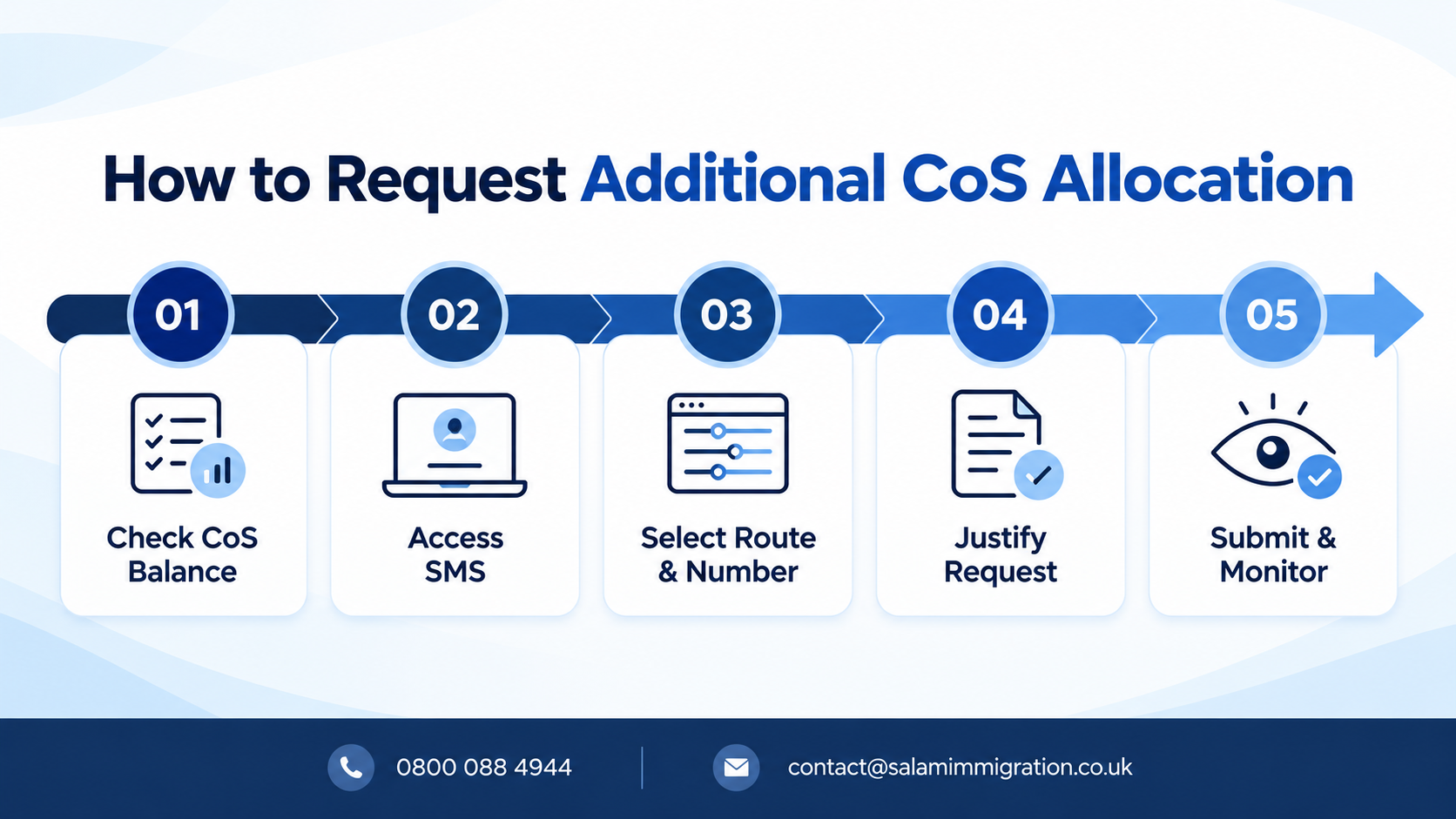
When you run short, you ask for an additional CoS allocation through your sponsor management system SMS account. The process is the same for a handful of certificates or a larger batch.
-
Check your balance. Confirm how many certificates remain and how many you expect to assign soon.
-
Log in as a Level 1 user. Only your Level 1 user can submit allocation requests.
-
Choose the route and number. Select the relevant route, such as the skilled worker route, and the number of additional undefined CoS you need.
-
Give a clear business justification. Explain the roles, why you need them and how they link to genuine vacancies.
-
Submit and monitor. Watch the account and your Authorising Officer’s email for any request for further information.
The Home Office tests whether the number you ask for is credible. Some third-party practitioners report that caseworkers may ask for supporting evidence, such as bank statements and an organisation chart showing where each sponsored role sits. Having this ready speeds up CoS allocation requests. The decision may also reflect the sponsor’s compliance history, so keep your records tidy.
Standard processing is the slow part. Third-party practitioners put standard processing of additional undefined CoS allocation at up to 18 weeks, which is why many employers use the priority route when the need is urgent.
The CoS Allocation Priority Service Explained
The CoS allocation priority service is a paid Home Office facility that speeds up a decision on certain requests. It allows sponsors to prioritise certain requests each day by submitting an application via email. Both additional and annual CoS allocation are on the list of eligible requests.
The allocation priority service does not change the standard assessment. It only changes the speed at which the request is considered. A weak or poorly evidenced request will be refused just as it would be under the standard service, and the fee is lost.
Who Can Use the Priority Service
Not every sponsor qualifies. The official GOV.UK priority change of circumstance service page sets out the eligibility criteria. You must be an A-rated, fully active licensed sponsor, and you must already have submitted the request on the SMS. The request must not be in progress or allocated to a caseworker.
Other limits apply to the CoS allocation priority service:
-
Student cases cannot use it.
-
Any request for additional certificates must be for undefined CoS only. Defined CoS requests are rejected and no refund is issued.
-
Post-licence requests for the GBM UK Expansion Worker, Service Supplier and Secondment Worker routes are not accepted, so a UK expansion worker sponsor must plan on standard timelines.
Priority Requests: Step by Step
The process has two stages. First you complete the standard request in your SMS account. Then you make your priority requests by email:
-
Submit your additional or annual undefined CoS request on the SMS.
-
Complete the Worker and Temporary Worker priority request form, making sure every field matches the SMS entry.
-
Email the form to the priority service mailbox. The subject line must include your organisation name, sponsor licence number and priority request type.
-
If accepted, you receive an acceptance email and a second email containing a Worldpay payment link. Check your junk folder if it does not arrive.
-
Pay the priority service fee within the deadline.
-
Respond promptly to any request for further information. Make sure your key personnel monitor the relevant inboxes.
Mismatches between the form and the SMS are a frequent reason for rejection. A second pair of eyes from your compliance teams before you press send is time well spent.
Priority Fee and Costs
The cost is straightforward: the charge for the service is £350 per request. This priority fee is separate from the usual costs of sponsorship, which still apply once the certificates are approved.
The priority service fee is payable only after acceptance, and the deadline is tight. Third-party guidance says you have 72 hours from the second email, weekends included. If you miss it, the request expires and you must start again. Treat the priority fee as a cost of urgency, non-refundable if the request is refused, and decide whether the delay it saves justifies the spend.
How Long Does Priority Processing Take?
Priority processing is quicker but not instant. Eligible requests with payment made are considered within five working days, counted from the following working day. Complex requests or those needing further checks can take longer, so build in a margin.
Securing a Priority Slot
The hardest part of the priority route is often getting a priority slot. The service is open from 7am to 5pm Monday to Friday, and a minimum of 120 requests are accepted each day. Those daily capacity limits are why employers talk about winning a slot rather than booking one. In practice it works on a first come, first served basis, so timing matters.
Requests outside service hours are not considered. If you do not receive a response, you should assume the request was not successful. To improve your chances of a priority slot:
-
Have the SMS request and the priority form ready before 7am.
-
Check the sponsor licence details on the form match your account exactly.
-
Attach any supporting evidence in the accepted formats at the first attempt.
-
Retry the next working day if the day’s priority slot allocation is exhausted.
Do not treat priority submissions as a substitute for planning. If no priority slot is available, you are back on the standard timeline.
Sponsor Licence Holders: Eligibility, Ratings and Allocation

You can only request or assign CoS if you hold a valid sponsor licence for the relevant route. Your rating matters too. A B-rated sponsor generally cannot assign CoS, with a narrow exception for in-country extensions the sponsor previously supported. In other cases an A-rating is needed.
A downgrade can therefore freeze your ability to hire and to use the priority route at the same moment. If your licence is under review, speak to a legal representative before submitting new allocation requests. Our guide to sponsor licence compliance duties, audits and reporting sets out how to protect your rating.
Costs: CoS Fee and Immigration Skills Charge
An allocation only gives you permission to assign. Each certificate then carries costs of its own.
You pay a fee for each CoS you assign, and for a skilled worker you will normally also pay the Immigration Skills Charge. Third-party fee tables list the Skilled Worker CoS fee at £525, but check the current figure on GOV.UK before budgeting.
The cos fee and the charge are costs for the sponsor. The guidance treats recouping, or attempting to recoup, the Skilled Worker certificate fee or related costs as a breach. Companies include all indirect and direct expenses when setting prices to avoid losses.
The Immigration Skills Charge can add thousands per worker. Our immigration skills charge guide for UK employers sets out the rates and exemptions. Budget for the immigration skills charge alongside the priority service fee when you cost an urgent hire.
Unused CoS: What Happens If You Do Not Assign Them
Over-requesting carries its own risks. Unused CoS may suggest that your original justification was inflated. Because the automatic allocation tracks how many certificates you assigned, a large unused balance also feeds into your next year’s figure.
Equally, do not hoard certificates. Review your balance each quarter. If you consistently finish the year with unused CoS, reduce your next request. If you consistently run out, ask for more at your next renewal, with evidence of growth.
Common CoS Allocation Mistakes to Avoid
Most refusals and delays come from a short list of avoidable errors:
-
Using the wrong certificate type. Assigning an undefined certificate where a defined one is required puts your licence at risk.
-
Requesting priority for a defined CoS. The request is rejected and the fee is not refunded.
-
Leaving it too late. If you start after the offer is accepted, standard timelines may overrun the start date.
-
Weak justification. A vague explanation is the commonest reason for further questions and refusals.
-
Wrong salary or SOC code. The gross salary on the CoS must not include allowances. Errors lead to problems with the worker’s visa application.
-
Mismatched details. Differences between the SMS entry, the priority form and your licence records cause rejections.
Accuracy at assignment matters as much as the allocation. Check the correct CoS category is selected, for example for an extension or a change of employment. Then check the job title, hours, address and salary before you assign CoS. Make sure they match the employment contracts you have issued.
Compliance After You Assign CoS
Allocation is the start of your obligations, not the end. Once you assign CoS and the worker’s visa is granted, your reporting duties begin. You must keep records, report changes and ensure the role matches what you declared. Failing to do so can lead to licence suspension or revocation, and to compliance concerns that make future requests harder to win.
Give your compliance teams visibility of every request, assigned certificate and sponsored role. A simple tracker listing each CoS reference, job title, start date and change helps you answer Home Office questions quickly. Our overview of immigration compliance when hiring international employees gives wider context for the sponsorship process.
Sponsored workers, including skilled workers applying from abroad and those switching in-country, rely on you to get the certificate right.
Planning Your CoS Allocation Strategy
A good strategy treats allocation as a rolling forecast rather than a one-off task:
-
Forecast hiring by quarter. Split expected hires into overseas recruits, who need a defined certificate, and in-country hires, who need an undefined certificate.
-
Keep a buffer. Maintain sufficient CoS for unexpected resignations, extensions and switches.
-
Request early. Submit standard additional undefined CoS requests well before the balance reaches zero.
-
Reserve priority for genuine urgency. Use it when delay would harm the business, not as a default.
-
Document the justification. Keep headcount plans, employment contracts and funding evidence ready.
-
Review annually. Compare your annual CoS allocation with actual usage before the CoS year ends.
Choosing the right adviser also helps. If you are unsure how to structure requests, our guide on how to choose a sponsor licence solicitor in London explains what to look for.
How Salam Immigration Can Help
Navigating CoS allocation requires expert knowledge of sponsor licence requirements and Home Office procedures. Salam Immigration supports UK employers throughout the sponsorship process.
-
UK Work Visas — Guidance on selecting the right visa route and managing your CoS allocation strategy.
-
Global Business Mobility Visa — Specialist support for overseas businesses allocating CoS to international staff relocating to the UK.
Frequently Asked Questions About CoS Allocation
What is the difference between CoS allocation and assigning a CoS?
CoS allocation is the number of certificates you may use. To assign CoS is to use one for a named worker by completing the details on the SMS.
Can I use the priority service for a defined CoS?
No. The service covers additional undefined CoS only, and a defined request sent for priority is rejected without a refund.
How much does the priority service cost?
The charge is £350 per request, payable only if your request is accepted for consideration.
How long do allocation requests take?
Standard requests can take many weeks. The priority route targets a decision within five working days of payment, though complex cases can take longer.
Do I need a valid sponsor licence to request more CoS?
Yes. You need a valid sponsor licence and, for priority, an A-rating and active SMS access.
What if my allocation runs out mid-hire?
Submit an additional request straight away. If the need is urgent and the certificate is undefined, consider the priority service. Until the new certificates are approved you cannot assign one to the worker.
Get Expert CoS Allocation Support
Managing Certificate of Sponsorship allocation correctly protects your sponsor licence and keeps hiring on track. Salam Immigration’s consultants are available in person, by phone or online to guide your CoS strategy and handle requests with precision. Contact us today for a consultation.