If you need to add Level 1 user sponsor licence access for a colleague, you can usually request the change through the Sponsor Management System (SMS) without submitting a new sponsor licence application.
For UK employers, maintaining access is essential for managing sponsored workers, assigning Certificates of Sponsorship (CoS) and meeting UKVI compliance requirements. Adding level 1 users is more crucial as the UK Government announced all existing Level 2 users must be upgraded to Level 1 or get deactivated by 8 March 2027.
If your only Level 1 user leaves, your business could lose access to important sponsorship functions, creating delays and potential compliance risks. At Salam Immigration, we help employers assess user eligibility, prepare supporting documents and manage changes to their sponsor licence access.
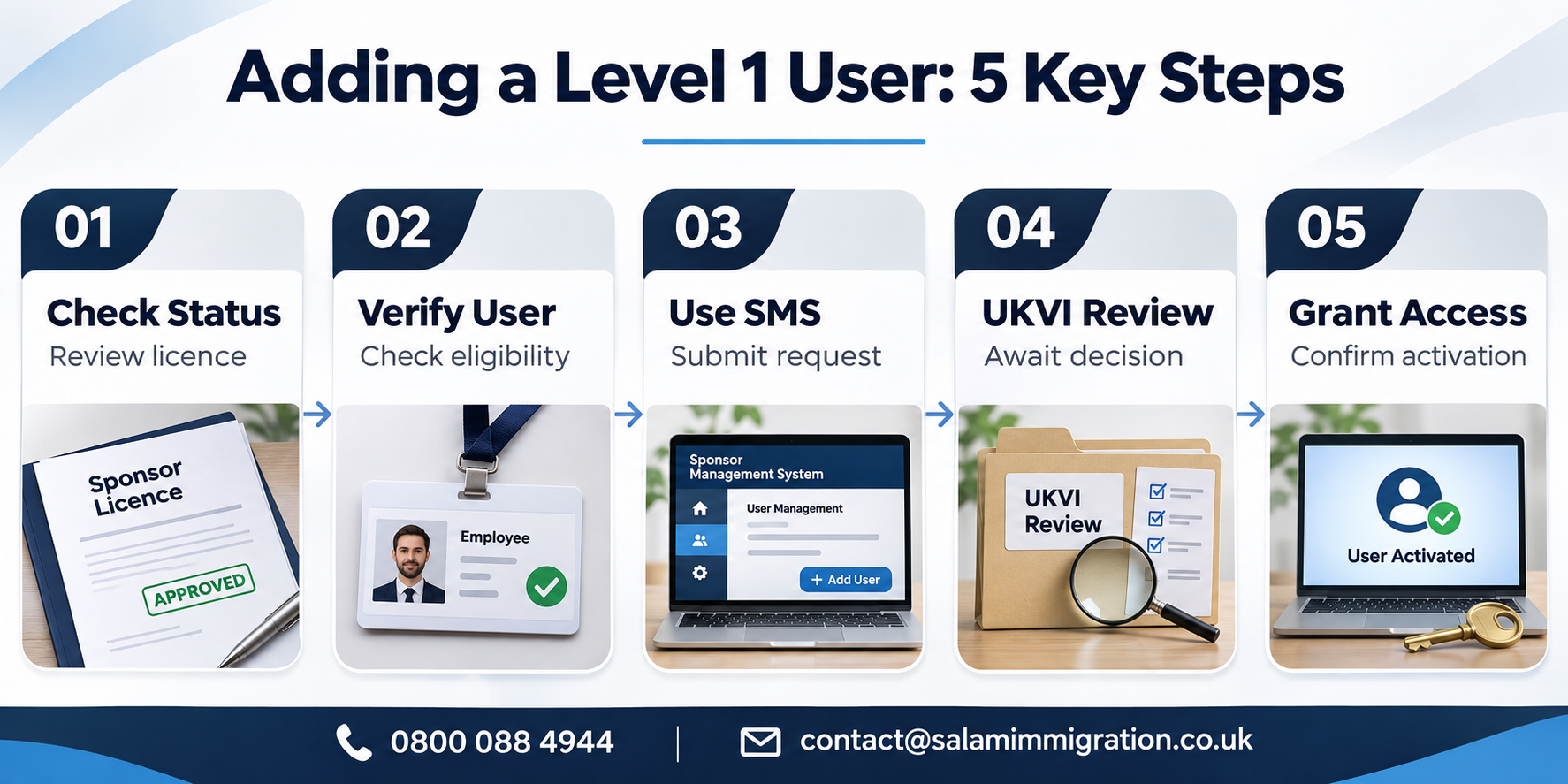
Quick Run-Through: Adding Sponsor Licence a Level 1 User
-
Check your rating: you can only change your Level 1 User, or add more Level 1 Users, when you have an A-rating for your licence.
-
Check eligibility: confirm the person is suitable and in an eligible category before you request access.
-
Request through the SMS: use the “Manage Level 1 and 2 users” function in the Sponsor Management System.
-
Wait for approval: the request goes to UKVI for assessment, then the password is emailed to the new user.
-
Keep records: update your internal user log and brief the new user on their duties.
Is Adding a Level 1 User a New Sponsor Licence Application?
Adding another Level 1 user is generally treated as an administrative change to an existing sponsor licence rather than a new sponsor licence application. Licensed sponsors normally submit the request through their existing SMS account.
This means a company does not need to repeat the full application process simply to appoint another eligible user. However, UKVI can still assess the proposed individual’s suitability before granting access.
Employers should ensure that their existing licence information is accurate and that the proposed user meets the relevant requirements. A failure to provide accurate details or respond to UKVI requests may result in delays or refusal of the user change.
The process differs where nobody can access the SMS, as the business must use the Home Office’s separate change of circumstances procedure.
What a Level 1 User Does on Your Sponsor Licence
A Level 1 user runs the licence day to day through the Sponsor Management System (SMS). Their tasks include assigning CoS to workers, asking for full CoS allocation, applying for Skilled Worker Defined CoS, and withdrawing CoS. They also report sponsored workers’ activity and tell UKVI about changes to your organisation.
The Authorising Officer and Key Contact do not automatically get SMS access. If either needs to use the system, they must also be appointed as a Level 1 user.
For the complete UKVI regulations, see guidance for sponsors on applying for a licence.
Who Can Be a Level 1 User for Licenced Sponsors
Eligibility depends on whether you are appointing your primary user or an additional one. Under the Home Office sponsor guidance, your primary Level 1 user must be an employee, director or partner and a settled worker. Additional users have wider options once your licence is granted:
-
Internal staff: a paid member of staff or an office holder within your organisation.
-
Outsourced HR: an employee of an organisation engaged to deliver part or all of your HR function.
-
Representative: a UK-based representative, formally appointed first. If you have only one Level 1 User, that person must not be a representative.
Choose carefully. Do not assume any sponsored employee can simply be given access, and check suitability first. The Level 1 User must be based in the UK if the AO is UK-based.
What Documents and Checks Are Needed to Add a Level 1 User?
Before requesting access, employers should verify the proposed individual’s identity, employment status and eligibility to perform the Level 1 role. UKVI may request supporting evidence to establish that the person meets its requirements.
Important checks include:
-
Employment evidence: Keep an employment contract, appointment letter or relevant company records available to establish the individual’s relationship with the sponsor, where required.
-
National Insurance number: The nominee normally needs a valid National Insurance number or evidence of a permitted exemption. If they have only applied for a number, check the Home Office requirements before proceeding.
-
UK residence: Key personnel must normally be based in the UK while performing their role. Specific exceptions apply, including certain UK Expansion Worker arrangements.
-
Suitability and criminal records: Individuals must satisfy UKVI suitability checks, including requirements concerning unspent convictions for relevant offences.
The Home Office can also examine the person’s immigration status and whether they are eligible to undertake the proposed role. Preparing accurate records helps your business meet UKVI requirements and reduces the risk of a delayed or unsuccessful request.
How to Add a New Level 1 User in the SMS
-
Log in to the SMS with your own Level 1 credentials.
-
From the licence summary screen, select Manage Level 1 and 2 users.
-
Choose the option to request a new Level 1 user.
-
Enter the person’s details accurately, including contact information, then select Add.
-
Check the Status field. If the status is Active, the request has been granted and the password is sent by email to the new user.
Where a request is not approved automatically, you may need to send a submission sheet or supporting documents, so keep your evidence ready. Do not share your own login details with the new user. At Salam Immigration, we help employers prepare and check this evidence before submission, so a missing document does not delay access.
How Long Does It Take to Add a Level 1 User to a Sponsor Licence?
Standard sponsor change of circumstances requests can take up to 18 weeks to process, although some Level 1 user changes may be approved much sooner. Employers should plan ahead if an existing user is leaving or a replacement is needed urgently.
Eligible sponsors can request the Home Office priority change of circumstances service, which aims to consider successfully accepted and paid requests within five working days.
The priority service is subject to conditions:
-
The sponsor must have a fully active, A-rated Worker or Temporary Worker licence.
-
The relevant request must already have been submitted through the SMS.
-
The request must not already be allocated to a caseworker.
-
The sponsor must follow the priority request procedure and pay the applicable fee.
The current published fee is £350 per request. The service does not guarantee approval within five working days if additional checks are needed.
Employers should monitor the SMS status and any UKVI correspondence received while awaiting a decision. A request being submitted does not mean the new user can immediately access the system.
What to Do If Nobody Can Access the SMS
This is the trap that catches smaller employers. You cannot use the SMS to report changes if you no longer have a Level 1 User with SMS access, for example if your only Level 1 User has left. You must instead complete the Home Office change of circumstances form to request a new user.
Until that is processed, you cannot assign a certificate or make reports, so act the same day you learn of the departure. Unless you are surrendering your licence, you must have at least one Level 1 User in place at all times.
How Does Your Sponsor Licence Rating Affect Level 1 User Access?
Your sponsor licence rating determines which sponsorship activities your organisation can perform. The Home Office generally awards an A-rating when approving a sponsor licence application, but UKVI may downgrade the licence if the organisation fails to meet its duties.
-
An A-rated, fully active sponsor can normally issue new Certificates of Sponsorship, subject to the relevant CoS allocation and immigration route requirements.
-
A B-rating restricts new sponsorship. Employers generally cannot assign a CoS to a new worker until their A-rating is restored, although limited extensions for existing sponsored workers may be permitted.
If a licence is suspended, the sponsor cannot assign CoS while the suspension remains in place. Suspension or downgrading can also affect automatic user-change functions.
The company’s available CoS allocation is separate from its rating. An A-rating does not guarantee a full CoS allocation, and requests for additional certificates remain subject to UKVI assessment. Monitoring licence status helps reduce the risk of unexpected disruption to sponsored recruitment.
Changing or Removing a Level 1 User
Level 1 users can deactivate SMS users who have left or are no longer suitable. Do this promptly, and always confirm another eligible user remains in place first. The Authorising Officer is responsible for their conduct, so you should not have more Level 1 users than you need, but you should have enough to cover absences.
Note that new Level 2 users can no longer be appointed from 9 September 2026, so Level 1 is now the route for anyone needing SMS access.
How to Prepare for UKVI Sponsor Compliance Checks
Appointing a Level 1 user is only one part of maintaining sponsor licence compliance. Under the UK’s points-based system, licensed sponsors must maintain accurate records, monitor sponsored workers and comply with applicable sponsorship requirements to remain compliant.
UK Visas & Immigration can conduct compliance checks before or after a licence is granted, including unannounced visits. These checks may assess whether the business has suitable systems to monitor its workers and fulfil its reporting duties.
Employers should regularly review SMS users, Certificate of Sponsorship records and information about their sponsored migrants. The Authorising Officer should also oversee system activity to identify mistakes or unauthorised access.
If the Home Office identifies serious compliance failures, the result may be a downgraded rating, licence suspension or revocation. Maintaining accurate records and responding to UKVI correspondence is essential to reducing this risk.
For further guidance, read our Sponsor Licence Compliance Guide.
Practical Do’s and Don’ts for Sponsor Management System
UKVI audits every Tier 2 sponsor at least once, so, it is better to be prepared in advance.
-
Give every user their own login and a secure work email address.
-
Log in regularly and keep user details current, including dates of birth and mobile numbers.
-
Do not let a user assign a certificate to themselves or a close relative.
-
Do not wait until a licence review or audit to tidy up your user list.
-
Do not ignore a downgraded licence rating: while suspended, the automatic add function can be withdrawn.
Level 1 user usually works closely with your Authorising Officer so, understand his duties too. Our team at Salam Immigration, with 20+ years of experience, often checks who holds each role before an employer makes any change, because one missing eligibility point can delay access.
Get Your Sponsor Licence Users Right With Salam Immigration
Managing sponsor licence users involves more than giving someone access to the SMS. At Salam Immigration, we help UK employers meet the relevant requirements and manage user changes while protecting their ongoing sponsorship responsibilities.
-
Skilled Worker Visa: we support employers and workers through sponsored applications, so your Level 1 users can assign a CoS with confidence.
-
UK Work Visas: we advise on the right sponsored route for your business and the user access you need to run it.
FAQ
Can I add a Level 1 user to my sponsor licence myself?
Yes, if you have an existing Level 1 user with SMS access and an A-rated licence. They submit the request through the Manage Level 1 and 2 users function.
How many Level 1 users can I have?
There is no fixed limit, as it is for you to decide how many you need. The guidance recommends keeping the number to what you genuinely require.
Can an external adviser be my Level 1 user?
Yes, as an additional user once your licence is granted, provided they are a UK-based, formally appointed representative. They cannot be your only Level 1 user.
What happens if my only Level 1 user leaves?
You must use the Home Office change of circumstances form to request a replacement. Until then, you cannot assign certificates or report changes through the SMS.
Does a Level 1 user need to be a settled worker?
At least one Level 1 user must be a settled worker and an employee, director or partner, unless an exception applies. Your other users do not all need to meet this test.
How do I remove a Level 1 user from the SMS?
Another Level 1 user deactivates the account through the Manage Level 1 and 2 users screen. Do this as soon as the person leaves or stops being eligible.
Speak to a Sponsor Licence Adviser
If you are unsure who should hold SMS access, our Skilled Worker Visa team can review your current users and help you plan for sponsored recruitment, while our UK Work Visas advisers can confirm which sponsored routes suit your business.
Speak to our immigration advisers in person, by phone or online through our contact page.
Note: This article is general guidance, not legal advice.